|
mrchris' |
land of funk |
Monday December 08, 2025 |
|
|
how to: (hack a new XBox by using a hacked one) |
11:28:49 AM Pacific |
|
home bio vehicle tv computers games music movies files links messages  guides
customize |
« |
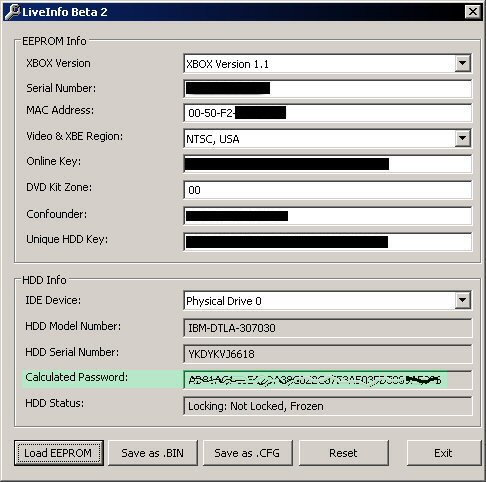
Updated: December 31, 2003 This guide explains one way to mod an XBox. There are a bunch of ways to do it so you should look around if you wanna see what else can be done. This guide will walk you through taking an existing modded XBox and cloning it's hard drive to a virgin XBox. Stuff you need: Doing the Dirty Work If you are fairly PC literate there are some steps below that can be omitted or modified to suit your unique setup. If you don't recognize those steps you should just follow the steps as detailed below. Connect the new hard drive to the Windows PC as a secondary master At the Windows PC, transfer the MechAssault savegame to your XBox memory card Connect the memory card to the virgin XBox and turn the XBox on with no game inserted Go to Memory and choose the memory card Copy the MechAssault savegame (usually called Run Linux) to the XBox's hard drive Put the retail MechAssault DVD into the drive and go to Campaign, then choose the Run Linux savegame. If you get an error when you choose the savegame you probably have a Platinum Hits or Game Of the Year version of MechAssault (look on the case cover) and those aren't usable EVOX will boot and show you the XBox's IP address in the upper left corner of the screen From the EVOX menu choose System Utils, then Backup FTP into the XBox from the Windows PC (default username is xbox, password is xbox and port is 21) Navigate to E:/UDATA/4d530017/62D648EBF155/ and transfer the backup folder to the Windows PC. You can turn off the XBox at this point Run LiveInfo on the Windows PC and click Load EEPROM Navigate to the backup folder that you FTP'd over from the XBox and choose the eeprom.bin file In the bottom half of LiveInfo, choose the new hard drive from the drop down list (it should be Physical Drive 1 if you connected it as a secondary master). If no drives appear it may be due to having IDE drivers loaded that LiveInfo can't use (i.e. the NVidia SW_IDE drivers on my NForce2 based motherboard). You can either revert to the default MS IDE drivers or connect to another PC with drivers that work
Write down the Calculated Password on your piece of paper by using your writing tool on the paper Create a DOS boot disk (either floppy or CD based) and copy ATAPWD, HDUnlock (and/or UnlockX), HDLock, HDDisabl and Ghost 2003 to it Power off the PC and disconnect the primary master and slave IDE ribbon cables Remove the hard drive from the hacked XBox and connect it to the PC as the primary master (it's likely jumpered as Cable Select by default for XBox use) Reboot the Windows PC with the boot disk. If the PC hangs at the IDE detection screen it's probably because of the locked hard drive from the hacked XBox. To get around this you should set the Primary Master to None in the BIOS and then unlock the drive with HDUnlock as described below. After it's unlocked, run HDDisabl (used the same way as HDUnlock) to keep it from locking when the PC is rebooted. Then you can reboot and let the BIOS detect it (which you'll need to do for Ghost to run) and continue with the remaining steps Type ATAPWD and press Enter The Primary Master drive should show a plus sign under the L and E. That means the drive is locked and we need to unlock it. Press ESC to leave the program Type hdunlock and press Enter Press the number that corresponds to the primary master (should be 1) Type in the password (lower case letters) for the hard drive (not the one you got for the new hard drive from LiveInfo; the one that corresponds to the hard drive from the hacked XBox). Double check that you typed it correctly and press Enter when you're done and it should say that the drive was unlocked Type ATAPWD and press Enter The Primary Master drive should show a minus sign under L now. If it doesn't, that means the drive is locked and you need to try unlocking it again. Press ESC to leave the program and either run HDUnlock again or try UnlockX if HDUnlock isn't working. If neither program works you likely have the incorrect hard drive password and you're pretty much outta luck Assuming the drive is unlocked you can now clone it by going to the directory where ghost.exe is (probably A:\Ghost) and type ghost /ir and then press Enter In Ghost, carefully choose to clone a disk to disk and choose the Primary Master as the source and the Secondary Master as the destination Depending on the PC's speed and the size of the drives, it could take an hour or a few hours When Ghost is finished cloning, go to the directory where HDLock is and type hdlock then press Enter Press the number that corresponds to the secondary master (should be 3) Type in the password (lower case letters) for the hard drive (this time use the one you got for the new hard drive from LiveInfo). Double check (very important) that you typed it correctly and press Enter when you're done and it should say that the drive was locked Type ATAPWD and press Enter The Secondary Master drive should show a plus sign under L now. If it doesn't, that means the drive is still unlocked and you'll need to try locking it again. Press ESC to leave the program and either run HDLock again or try UnlockX if HDLock isn't working If you had to use HDDisabl on the hacked XBox's hard drive (primary master) to get the PC to boot, you need to run HDLock as noted above but select the Primary Master (should be 1) as the drive to lock and make sure to use it's own password Power down the PC and jumper both hard drives as Cable Select, then install them in their respective XBox Turn on the XBox and enjoy. Don't forget to store the paper with the new hard drive's password somewhere safe Troubleshooting  Printable version Printable version |
|

|
site help |
email Mr. Chris or post a message or 8283-6958-2055-1402 |
This page was spit out in 0.000976 seconds