|
This guide will explain how to convert an unlooper so it will work in Phoenix mode.
Phoenix mode lets the unlooper act like a programmer for cards to be used in emulators.
Preparing the unlooper
If you have an unlooper that can be flashed without changing a capacitor you can skip the 4 steps below. If you are unsure just skip down to the section titled Flashing the unlooper. If your unlooper needs to be modified in order to be flashed (like mine) follow these
steps:
01. get a .0047uf capacitor that operates from 35-50V (I used one that was rated to 100V. I don't know anything about electronics and it was all the
store had so I used it)
02. locate the capacitor labeled "C3" (this was a square, tan-colored cap on my red unlooper)
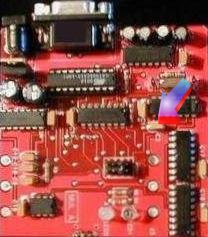
03. remove this cap by de-soldering the 2 connection points and pulling it out
04. solder in the .0047uf cap in place of the one you just removed
Done deal. That mofo should be flashable now.
Note: Before performing the steps below in Flashing the unlooper: you should have a readable H card. In my case I had to change the capacitor as described in the 4 steps above and then I had to flash my unlooper
(WTX model) with SU2 code (not the same as the SU2 bootloader code described below in Flashing the unlooper:). The
SU2 code allowed me to run the DOS
su2v2.exe to get a valid ATR from my Black Sunday ECM'd card and apply a clean, valid bin image at USW 26. You need a clean H card at USW 26 in order to
AUX the card for use in an emulator.
WTLoaders are available here
To owners of SU2 unloopers or people looking to buy a new unlooper:
If you are looking to buy a new unlooper just get one with an SU2 chip pre-installed and run
su2v2.exe to get a valid ATR from a Black Sunday ECM'd card and apply a clean, valid bin image at USW 26. If your unlooper is not flashable you will still need to change the capacitor as described above before continuing.
Flashing the
unlooper
To make the unlooper work in Phoenix mode you need the modified Atmel code for your unlooper's particular chip (ie.
WTX, WT2, SU2). You can
get the flash programs here. Once you have the files, just extract and copy them to a directory on your hard drive or onto a boot floppy. Then follow these steps:
01. connect your unlooper to COM1
02. reboot into DOS mode (either by pressing F8 at boot up or by using a Win9x/ME boot disk)
03. run the downloaded bootloader EXE that matches your unlooper's WT chip and after about 30 seconds your unlooper will be flashed. If you get an error message make sure you have connected the unlooper to COM1 and that COM1 works. If you are sure COM1 works you may have to perform the capacitor modification as described above in Preparing the unlooper:
04. pull the Atmel chip out of the socket it's inserted into
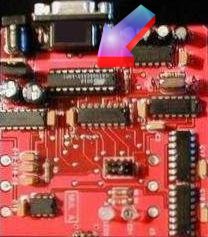
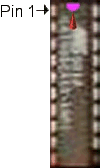
05. carefully bend the leg of pin 1 enough that it won't make contact when re-inserted into the socket (I snapped mine off).
Pin 1 is usually on the left side of the Atmel chip where the top has a
notch or arrow as denoted in my kick ass picture below
The unlooper can now operate in Phoenix mode. If there is a card inserted into the unlooper's socket when you apply power to the unlooper, it will be in programmer mode (both LED's on the unit should be lit) and can be used in an emulator. If the card socket is empty when you apply power to the unlooper, it will be in unlooper mode (only one LED on the unit should be lit).
 Printable version Printable version |
 guides