how to: (use FTP without being gay)
This guide will explain how to use Bullet Proof FTP on a Windows computer while observing proper etiquette so you don't get kicked or banned. If you prefer to use FileZilla (recommended), click here for that guide
Installation and configuration
The first thing you need is the client. I use Bullet Proof FTP but there are others like CuteFTP, WS-FTP, etc. which I don't use anymore because compared to Bullet Proof they = ass. Bullet Proof is shareware for 30 days. There are cracks available if you know where to find them (don't ask me) but I've been told that they don't work and will display an "Illegal keymaker detected" message randomly. Anyway, after you've installed the program, start it and go into Options --> General Options. In the General tab change the Retry delay (seconds) to a value which will not Hammer a server. Hammering a server refers to having too small a delay between connection retrys to a busy (full) server. If you're trying to connect to an FTP server from an IRC channel (see IRC guide), and your retry delay is too low you will be banned from that server. Good move ass-o. The next option to change is the Maximum number of retries. I set mine to 999. That means if a server is busy (full) it'll try to connect 999 times with a 65 second delay between attempts. That should be enough to transfer a queue (explained below) while you sleep.
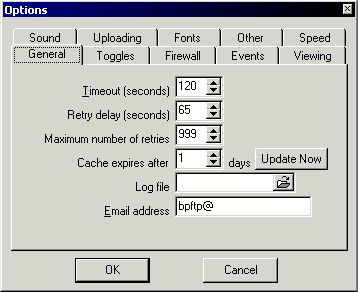
In the Events tab click the radio box beside Disconnect from site under the On transfer completion section. This will automatically disconnect you from the server after your queue is transferred. Most FTP server operators don't want you idling (doing nothing) on their servers. You have 10 seconds to cancel the automatic disconnect if you decide there's something else you need to do. Disconnecting when your queue is sent is just common courtesy. Other crap you can do is specify event sounds in the, wait for it now, .... Sound tab.
Connecting to an FTP server
To connect to a site, put the address in the Host field. Most FTP servers run on port 21 so you can leave that as is (most *cool* sites run on custom ports so if you find one in IRC put the appropriate number in here). The Login is the username and the Pass is the password. Most FTP servers allow anonymous access so you can just leave the Login field blank and enter a valid email address as your password. The *cool* sites (like those listed in IRC channels) usually have username/passwords which are listed in the channels.

Some sites may require you to check the Use passive mode box in order to retrieve directory listings. If you connect to a site and the directory contents don't display, disconnect and either check or uncheck this box in Options --> General Options --> Firewall and try connecting again. Once you reconnect, click inside the FTP server's directory window and press F5 to force a refresh of the server's contents. If you still don't get a listing you should give up and turn off your computer or start writing complaint letters or some other stupid crap that I don't wanna hear about. If you want to "bookmark" the site you're currently connected to, go to File --> Add current FTP site to list. To access your "bookmarks" click the Site manager icon  .
.
Queuing and transferring files
When you find a file that you want to transfer double-click it and it will be added to your queue window (bottom window). If you want to transfer multiple files you can select them by holding the CTRL key while you single-click each file or, if they're in a continuous block, hold the SHIFT key while clicking on the first, then last file. To transfer your queued files, click the green Go button on the toolbar. For some of the *cool* sites you can connect with a "Look" only account which will let you browse the site and queue files but not transfer them. After you disconnect, wait for the appropriate retry delay (as explained above to avoid Hammering) and try connecting with the full access username/password. The best sites are usually very busy so you'll probably have to leave the computer on all night trying to connect. Hopefully when you wake up your queue will be transferred or at least transferring. To upload files you should make sure you are in the appropriate directory with write access. Common directories include Upload, Incoming or some other stupid ass description. When you're in the right directory click the file(s) in your computer's listing window and click the Upload icon (picture of a semi-open folder with an arrow pointing up). Click the green Go button to start the transfer.
Have fun FTP'ing and don't piss off the site ops